Installation
install.Rmd💻 R and RStudio installation
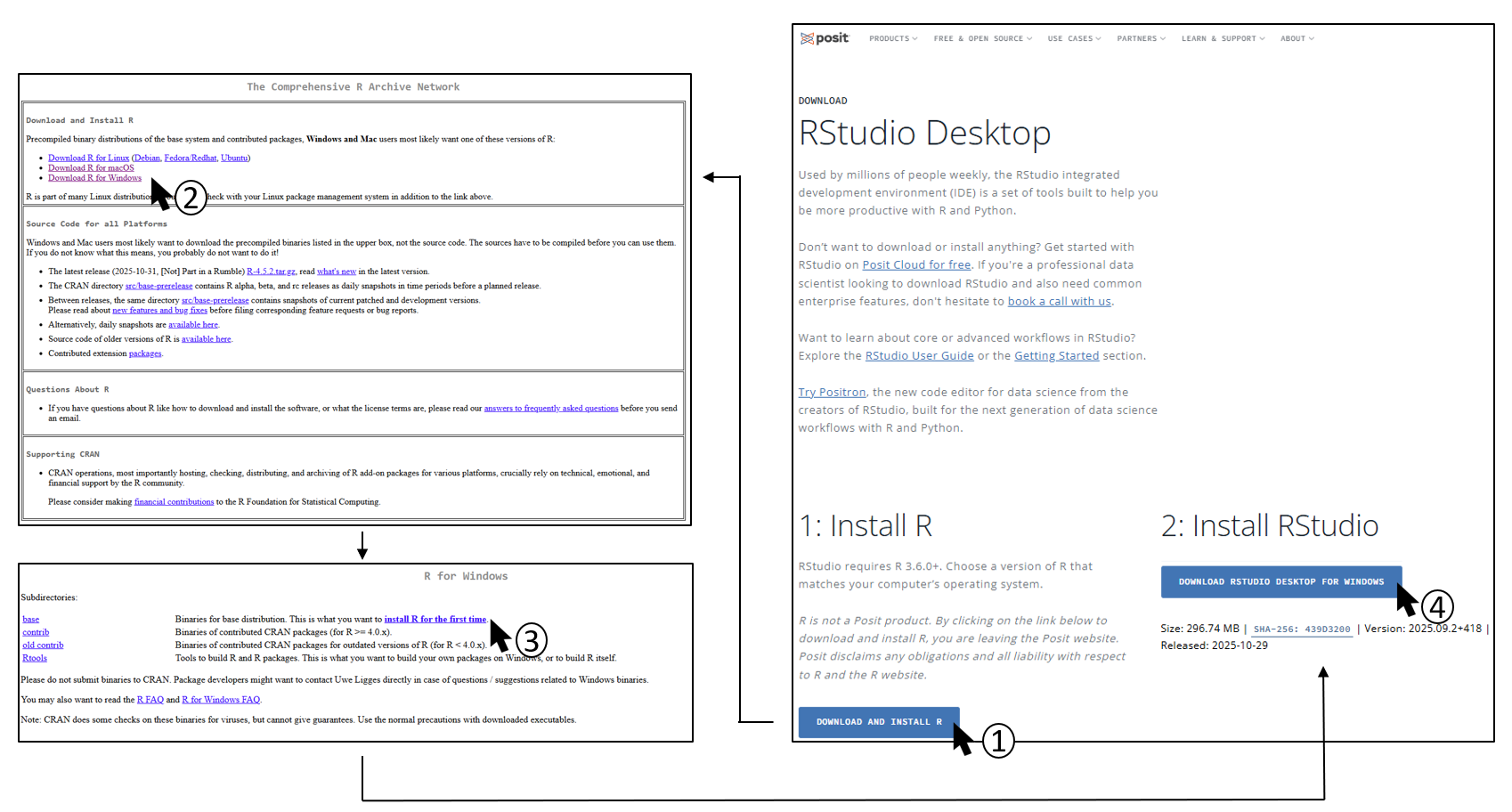
To use the EDITH package, you first need to install R
and RStudio on your computer. You can directly go on the posit.co
website (https://posit.co/download/rstudio-desktop/) and follow
the instructions:
📦 Package installation
You can know open RStudio and install the EDITH package
by running the following code. You can just copy-paste it into the
RStudio console and hit Enter.
if (!requireNamespace("remotes", quietly = TRUE)) {
    install.packages("remotes")
}

if (!requireNamespace("ComplexHeatmap", quietly = TRUE)) {
    if (!requireNamespace("BiocManager", quietly = TRUE)) {
        install.packages("BiocManager")
    }
    BiocManager::install("ComplexHeatmap")
}

remotes::install_github("mathilde-robin/EDITH")
Once the installation is complete, you can load the package by running:
library(EDITH)🎉 If you don’t see any error, you are now ready to use the
EDITH package!
🔎 For more information on how to use it, please refer to the vignettes:
- for two drugs: https://mathilde-robin.github.io/EDITH/articles/two_drugs.html
- for three drugs: https://mathilde-robin.github.io/EDITH/articles/three_drugs.html